
Getting started
Beginner's Guide
The first 10 minutes
- Create an account, pick a server and choose your company (MDO / EFA / VCO). The company choice is cosmetic and social; there is no difference in power.
- You spawn next to the protected base on your company's map 1 (MDO-1 / EFA-1 / VCO-1). Your starting ship is the Fenix
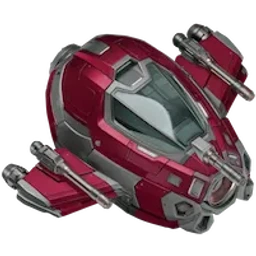 , your starting balance is
 100,000 Credits.
- Hunt NPCs: your first target is the Drifta
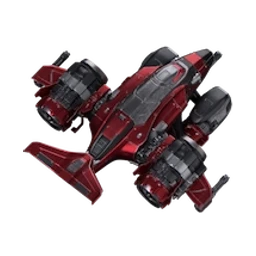 — the weakest alien, and passive (it won't attack unless you fire first). It is found in swarms on tier 1 and tier 2 maps.
- Collect your reward: every NPC kill gives you Credits, XP, Honor and Frostium; it drops a cargo box full of ore, and with luck a Loot Box and crafting materials too.
- Return to base, sell, gear up: sell ore at the base (F panel) and buy lasers/generators/ammo with the money. The first quest chain (starting with "Ground Zero") rewards this loop — never leave your quest list empty.
- You are PvP-protected until level 14: you can't damage other players and you take no damage from them. Use this time to gear up.
How to earn money
| Method | What to do | Details |
|---|---|---|
| NPC hunting | Hunt aliens suited to your level; Boss versions usually give 2× the reward | NPCs — every NPC's reward, cargo and materials |
| Ore | Collect cargo boxes and sell them at the base. Refined upper ores (Titanite, Radion, Pyronite, Cryonite) are worth more for enrichment (temporary power) than for selling | Ores |
| Quests | Keep main, daily and weekly quests active — they give large amounts of Credits/Frostium and equipment | Quests |
| Boxes | Collect Bonus Boxes on the map; open Frost/Magma boxes with a Loot Key | Boxes |
| Galaxy Gates | Collect parts, open the gate, clear 10 waves | Galaxy Gates |
| Events | The company that wins Spaceball gets ×2 NPC rewards for 2 hours | Events |
| Daily login | Log in every day and claim rewards from the 28-day calendar | Daily Login |
Ship upgrade path
Base ships are bought with two currencies: the Credits path is safe progression, the Frostium path gives strong combat hulls. Some Frostium ships can also be built with materials at the crafting bench.
Credits path: Fenix (starter) → Anvil (100,000 Credits) → Raven (500,000 Credits) → Kodiak (2,000,000 Credits) → Arcturus (5,000,000 Credits)
Frostium path: Pincer ( 25,000 FRS) → Oryx (80,000 FRS) → Pusat (150,000 FRS) → Lightning (200,000 FRS)
Designs (Fire, Premium, Bastion…) are skins sold for Nova; some give a small bonus — not important when starting out.
Loadout basics
- Lasers go into laser slots and consume ammo. A laser without ammo won't fire — LMA-01 is the basic ammo, never let your stock run out. Total damage = number of lasers × laser damage × ammo multiplier.
- Generators: shield (SGN) and speed (SPD). The shield absorbs part of incoming damage before your hull.
- Drones: fly next to your ship; each drone has its own slot (laser/generator), up to 8 drones. A drone design gives a bonus to every drone it is fitted to.
- Extras (CPU): passive bonuses (repair robot, auto rockets, cargo) and active modules (EMP, SMB, cloaking, wall shield).
- Your ship has 2 configurations (switch with C): e.g. one for attack, one for escape/shield.
Map safety
- Tier 1 and tier 2 maps (home zone) have a low level requirement; here you can't fire on your own company. Bases and portals are safe zones that protect only that map's company.
- Enemy company maps require a higher level to enter, and you are open to attack there.
- 4-4, Uber and X-5 Pirate are neutral PvP zones: anyone can attack anyone, and after taking damage you can't escape through a portal for 10 s. High reward, high risk.
- On the Invasion map players cannot attack each other; you only fight the creature waves.
- When you die, 20% of the ore in your cargo is scattered into space — don't dive into a PvP zone with a full cargo hold, sell first.
Progression
Hunting NPCs earns you XP (level) and Honor; your rank is determined by the company rank points ranking (XP, Honor, level, NPCs, quests and account age give points). Leveling up unlocks new quests, maps and crafting recipes.
Controls (PC defaults — can be changed in Settings > Shortcuts)
| Key | Action |
|---|---|
| Left click | Move / select target (hold to make the ship follow the cursor) |
| Ctrl (left) | Start / stop attack |
| Space | Fire rocket |
| D | Fire salvo (rockets loaded in the launcher) |
| J | Jump through portal (when in portal range; you can also click the badge above the portal) |
| C | Switch configuration (1 ↔ 2) |
| 1 – 0 | Action bar 1 (ammo, rockets, extras…) |
| Q R E W T G Y H Z V | Action bar 2 (Nano Repair = T, Energy Absorb = G, Shield Surge = Y, Lightning = H recommended) |
| Tab | Item palette (edit the action bar) |
| B | Main menu |
| M | Galaxy map (warp from here) |
| F | Ore panel (refinery & enrichment) |
Action bar (PC): the blue bar above each slot shows the ammo/rocket amount (10,000 and above = full); laser ammo slots show the damage multiplier (LMA-01 x1 · LMA-02 x2 · LMA-03 x3 · UCP-04 x4 · SAB-02 x5 · RSB-06 x6), and the selected ammo/rocket has a gold frame. When you use an ability the slot darkens and lights up again as the effect runs out (countdown in green), then darkens again and lights up during the cooldown (countdown in red); extras show their cooldown the same way.
Mobile (Android): virtual joystick + fire button + rearrangeable HUD (Settings > Control layout: button size, opacity, position).
Values are taken from the live game and may change with balancing. Last updated: November 17, 2026.